AniMN.gif (12519 bytes) Bruce Jaeger Technical Services
5500 80th Avenue North • Brooklyn Park, MN 55443
(763) 560-7663 voice   (763) 560-2466 fax

Email: Bruce@BJTechServ.com     
Home | Customer's Pages | Utility Programs | Bruce's Scrapbook
Bruce's Scrapbook: Scrapbook Home | Music | Sports Cars | Magazine Articles | Railroad | Garage Sale

This is just a lot of personal stuff that is sure to be of interest to researchers around the world. Check out the "Music," Sports Cars" and "Magazine Articles." Oh! And there's that Garage Sale...

C.J. Anderson on Bruce Jaeger            Bruce Jaeger on C.J. Anderson

C.J. Anderson's "Pre-Arranged" Obituary of Bruce Jaeger
(as long as he's not also pre-arranging its timeliness...!)

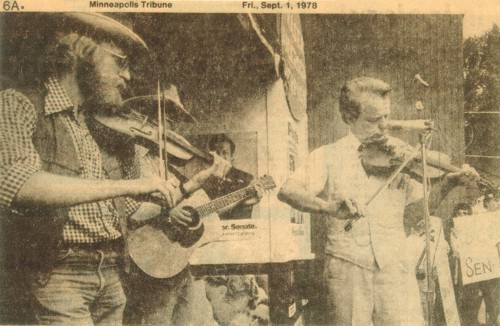
Bruce_and_Sen_Byrd.jpg (60282 bytes)

That's me (left) fiddling with Sen. Robert Byrd (D-WV), 1978.


Bruce's Wierd XP Tips and Workarounds

(Placed here to see if the search engines find it They will!)

Getting Golf.exe and Cruel.exe to work on Windows XP: They don't work on XP because they look for CARDS.DLL, and expect a 16-bit version. Microsoft, in its usual infinitely unthinking arrogance, replaced this with a 32-bit version for XP, re-compiling Freecell and Solitaire in the process, but ignoring owners of the older games. They COULD have named it "CARDS32.DLL" and made everybody happy.

The solution is to copy your old "CARDS.DLL" to the folder that Golf.exe and Cruel.exe are in. As you don't want to overwrite the new CARDS.DLL, just make sure you move the old games somewhere else other than the Windows directory, like "C:\Program Files\Games" for example.  The old card games are simple enough that they don't care what directory they're in, and theres no fancy registering, etc. The games will look in their own directyory for CARDS.DLL before looking in C:\Windows\System, and everything will work fine.


.


Hit Counter